


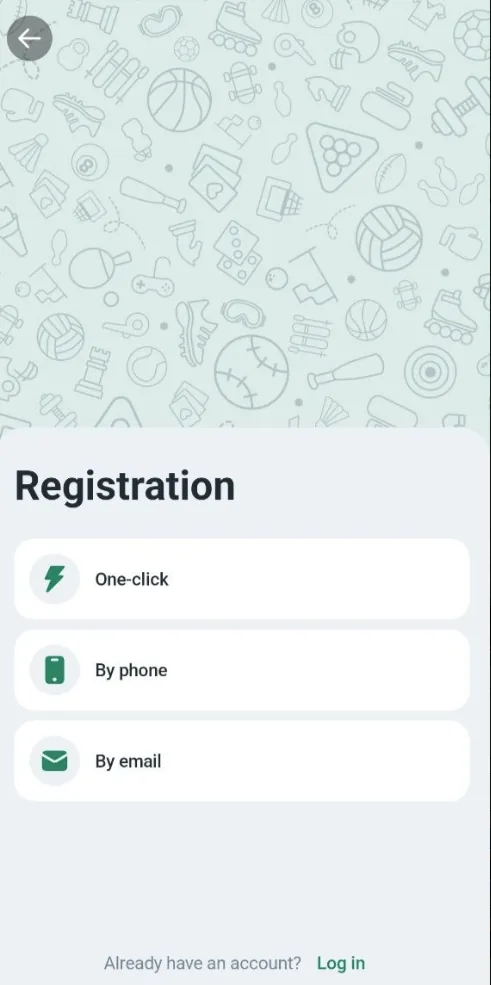
On the website BetWinner has four sign-up tabs: By e-mail, By phone, One-click and Social networks and messengers, and pressing Register confirms that you accept the Terms and Conditions and the Privacy Policy and that you are of legal age. In the BetWinner app, the Registration screen offers three methods, One-click, By phone and By email, and the one-click form has three separate tick boxes for these confirmations.
Registration Methods
- By phone: the phone number with its country code, a sending method for the code (SMS by default), the code itself, the account currency and an optional promo code.
- By e-mail: country, region, city, currency, e-mail, phone number, first name, surname, date of birth, a password typed twice and an optional promo code. The mobile version splits these fields into 3 steps.
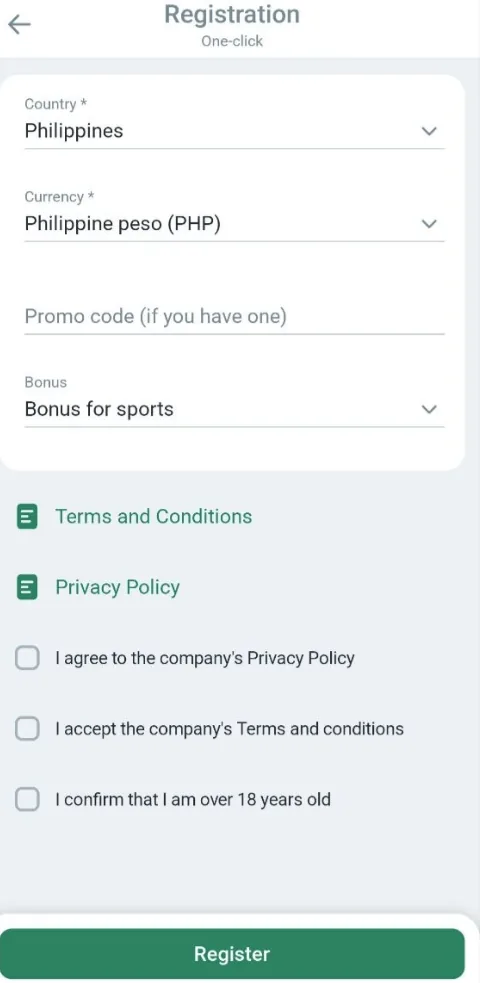
- One-click: the country, the currency and an optional promo code. In the app the form adds a Bonus field.
- Social networks and messengers: a social network or messenger account, plus the country and the currency.
One-Click Registration in the App
- Open the app, tap Registration and choose One-click.
- Check the country and the currency: Philippines and Philippine peso (PHP).
- Enter the promo code PHBETT.
- Choose the welcome offer in the Bonus field, for example Bonus for sports.
- Tick the three boxes: consent to the Privacy Policy, acceptance of the Terms and Conditions and confirmation that you are over 18.
- Tap Register and wait for the reCAPTCHA check to finish.
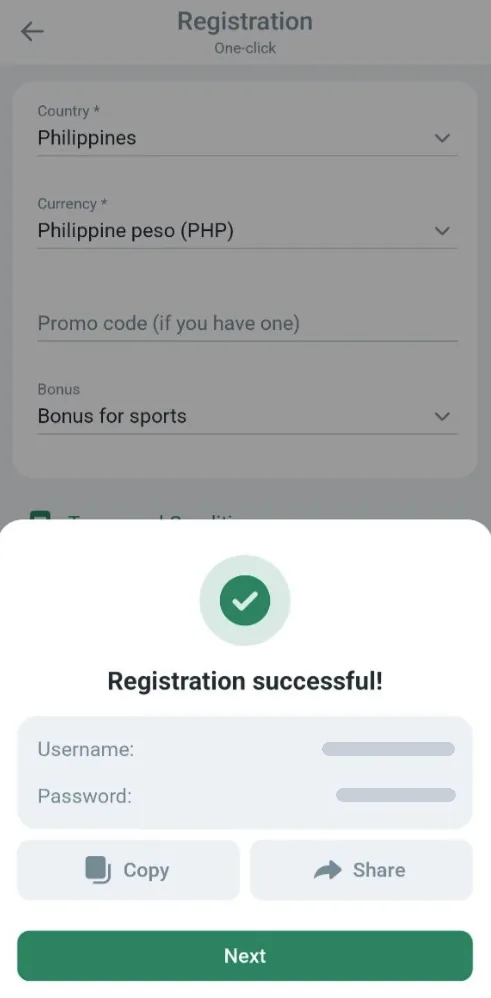
- Save the username and password from the Registration successful window with Copy or Share, then tap Next. The username is a 10-digit account number.
How to Register by E-mail
- Open betwinner.com and tap Registration, then the By e-mail tab.
- Pick a welcome offer at the top of the form: Bonus for sports, Casino + Win Games, or Reject bonuses to decide later.
- Select Philippines as the country, then the region and the city.
- Select Philippine peso (PHP) as the currency. The list has 129 currencies.
- Fill in the e-mail, phone number, first name, surname and date of birth as they appear in your ID.
- Type the password twice and enter the promo code PHBETT.
- Tap Register.
Verification
The KYC policy asks every customer for the full legal name, date of birth and permanent residential address, and checks identity during registration and before some account actions. Documents have to be clear, valid and unaltered. When there is doubt, BetWinner may ask for notarised copies, run a biometric check or screen the data against databases. A new check can follow a change of address, payment method or country.
The bonus rules add two limits: one bonus per person, family, address, shared computer and IP address, and a forfeited bonus if requested ID documents are not provided. The responsible gambling policy also recommends keeping a single account.
Both welcome offers, 100% up to ₱6,000 for sports and up to ₱86,500 with 150 free spins for casino, are credited only after every personal information field in My Account is filled in and the phone number is activated. The BetWinner first deposit bonus also needs an opt-in before the deposit.
Sources and Check Date
Checked on November 24, 2026:
- BetWinner registration form, country Philippines, currency PHP
- BetWinner app registration screens, screenshots of November 25, 2026, taken from the Philippines
- BetWinner KYC policy
- BetWinner first deposit bonus terms, PHP version, screenshots taken from the Philippines
- BetWinner casino welcome package terms, PHP version, screenshots taken from the Philippines
- BetWinner responsible gambling policy